

Payout Integration Flow
This page shows the sequence of API calls and webhooks involved in a single payout, end-to-end. Use it as a reference while implementing the integration — each interaction below maps to a documented endpoint or event.
Sequence of calls
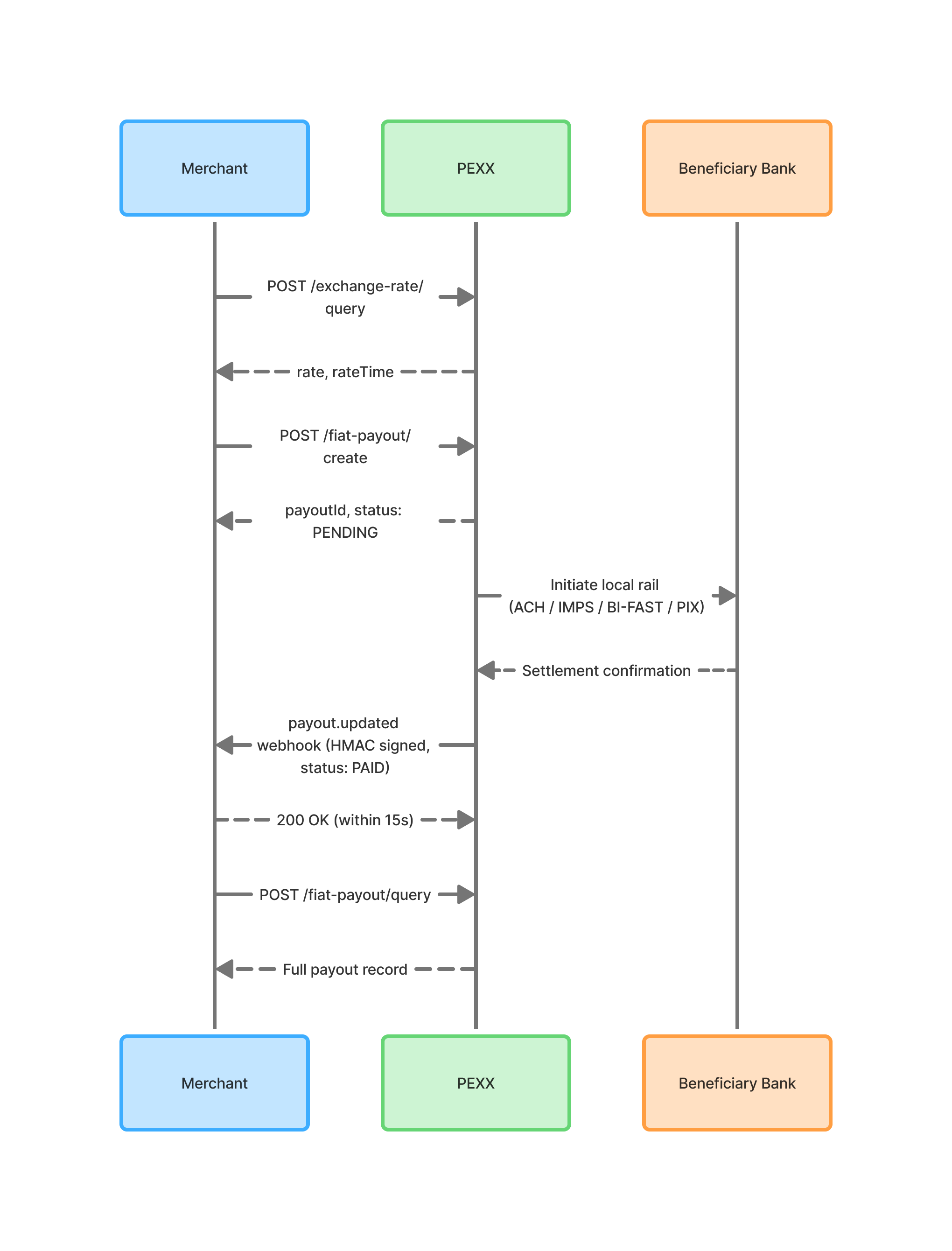
A typical successful payout involves four interactions with PEXX: an optional rate quote, the create call, a webhook on settlement, and a reconcile call to confirm. The diagram below shows the timing and payloads of each.
Step-by-step
- Quote the exchange rate (optional)
Call POST /exchange-rate/query to retrieve the current rate for your deductionCurrency to payoutCurrency pair. The rate returned is indicative — the rate that actually applies to your payout is the one returned by the create call. Use this step if you need to display an estimate to your end-user before committing. See [Exchange Rate API]. - Create the payout
Call POST /fiat-payout/create with the payout amount, beneficiary details, and a unique merchantReferenceId. PEXX debits your balance synchronously and returns a payoutId along with the applied rate and fees. The response status will typically be PENDING. See [Create Payout API]. - PEXX settles the payout (no action required)
PEXX converts the stablecoin to fiat and sends it over the appropriate local rail (ACH, SEPA, BI-FAST, PIX, or others depending on the corridor). Settlement is asynchronous and can take from seconds to several hours depending on the rail and time of day. Your integration does not need to do anything during this period. - Receive the webhook
When the payout reaches a terminal state, PEXX sends a payout.updated event to your registered webhook endpoint. The terminal status will be either PAID (funds delivered) or CANCELLED (funds returned to your balance). Verify the HMAC signature and return a 2xx response within 15 seconds. See [Webhooks → Payout Event]. - Reconcile via query
After receiving the webhook, call POST /fiat-payout/query with the payoutId to retrieve the full payout record. Use this call to confirm the final state before marking the payout as resolved on your side. See [Query Payout API].
Updated 5 months ago
Did this page help you?